New feature

Contact forms that actually lead to something

Build forms that capture leads straight into the CRM. New customers are created automatically. Existing customers are updated. No third-party tools.

Included in AIFlow. No extra cost.

There is a better way to handle enquiries

You have a contact form on your website. Someone fills it out. You get an email. Sometimes you reply straight away. Other times it sits a bit too long.

There is nothing wrong with that. But imagine if the enquiry moved itself forward instead. The person added straight into your customer system, linked to the right company, with a reminder to follow up.

That is what AIFlow does.

New customer? New card. Existing customer? Updated automatically.

When someone fills out an AIFlow form, the data goes straight into the CRM. If the person already exists, the enquiry is linked to the existing customer card. If it is a new contact, everything is created automatically. Name, company, contact details and the enquiry. All in place.

Someone on your team is notified to follow up. You do not need to copy anything. You do not need to check your inbox. Next time the customer gets in touch, you have the full history.

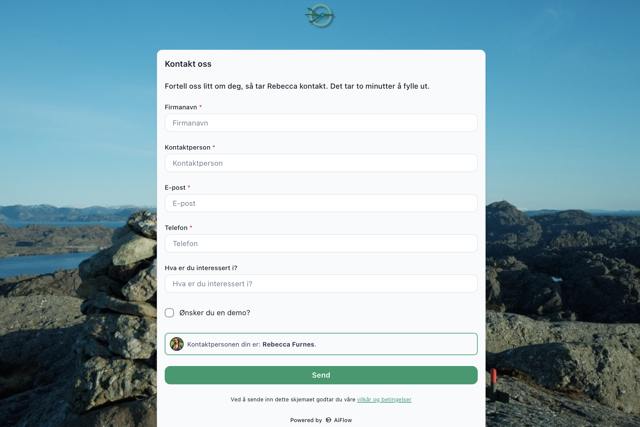
AIFlow contact form with automatic CRM connection

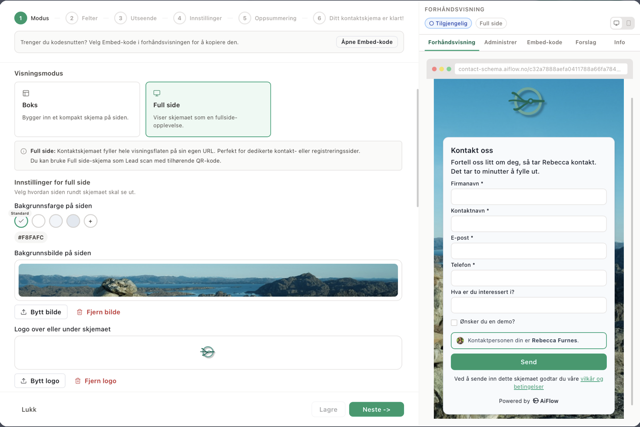
You build it yourself. In a few minutes.

Choose a ready-made template or start from scratch. Drag in fields, pick colours, add your logo. Five steps, no coding.

1

Choose mode

Give the form a name and choose whether to embed it on a website or host it on its own page with a QR code.

AIFlow form builder — step 1: choose mode
2

Add fields

Choose from standard fields like name, email and phone. Create custom fields for anything else you need to know.

AIFlow form builder — step 2: choose fields
3

Customise the design

Pick colours, upload your logo, adjust rounding and shadow. The form matches your website.

AIFlow form builder — step 3: visual design
4

Write the text

Change the title, introduction and button text. Choose who receives the enquiry and add a contact person with photo.

AIFlow form builder — step 4: settings
5

Publish

Review the summary and copy the code to your website. Done.

AIFlow form builder — step 5: summary

A lead scanner you take everywhere

Every form in AIFlow can get its own web page with a QR code. Print the code on business cards, brochures or roll-ups. Someone scans, fills out on their phone, and is in your CRM immediately.

Imagine a trade fair. You talk to ten people in a day. Instead of collecting business cards in a pile you might go through on Monday, you have everyone in your system before you leave. No apps. No extra subscriptions. Just a QR code and AIFlow.

See an example of a finished form
AIFlow QR code for lead capture at trade fairs and events

Follow-up starts on its own

You decide in advance who handles the enquiry. The right person is notified. A reminder is set. The whole team can see who has replied and who is still waiting.

Every enquiry is visible to the whole team. Always.

One system. No extra tools.

You build the form in AIFlow. Data lands in AIFlow. Follow-up happens in AIFlow. You do not need Typeform, Google Forms, Zapier or anything else on the side. Everything is in one place.

Try it yourself

This form is built in AIFlow. Fill it out and you will hear from Rebecca within one business day.

Do I need coding skills to create a form?

No. You choose a template, adjust the fields and press publish. It takes a few minutes.

Does the form work on websites not built in AIFlow?

Yes. You get a code to embed on any website. You can also share the form as a link or QR code.

Does the form builder cost extra?

No. It is included in AIFlow. No add-ons.

Curious how it works?

We will show you the form builder live. 30 minutes. No obligations.