Filter on columns, status, date, owner or custom tags
Quick version
The AIFlow customer overview in 40 seconds
The customer overview in AIFlow CRM is a table view of every customer, supplier and lead in your business. Filter by industry, status, owner or custom columns. Saved filters can be shared with the whole team. Brønnøysund updates organisation name, address and NACE industry code every day. You can edit directly in the table without popups, and open the customer card with one click.
Definition
What is a customer overview?
A customer overview is a unified table view of every customer, contact and company you work with. It lets you filter, sort, segment and find the right customer without opening every individual customer card. For many businesses a good customer overview replaces the spreadsheet and the shared folder, and becomes the place the team actually works from each day.
In AIFlow the customer overview is a living list, not a static export. It updates in real time when someone on the team adds a contact, sends a quote or receives an inquiry. The Brønnøysund integration refreshes organisation name, address and industry code every day, so the list is always right. You can build and save filters for VIP customers, forgotten follow-ups or companies under liquidation, and share them with the whole team.
Customer table
Live list
08
Saved filters
24h
BRREG refresh
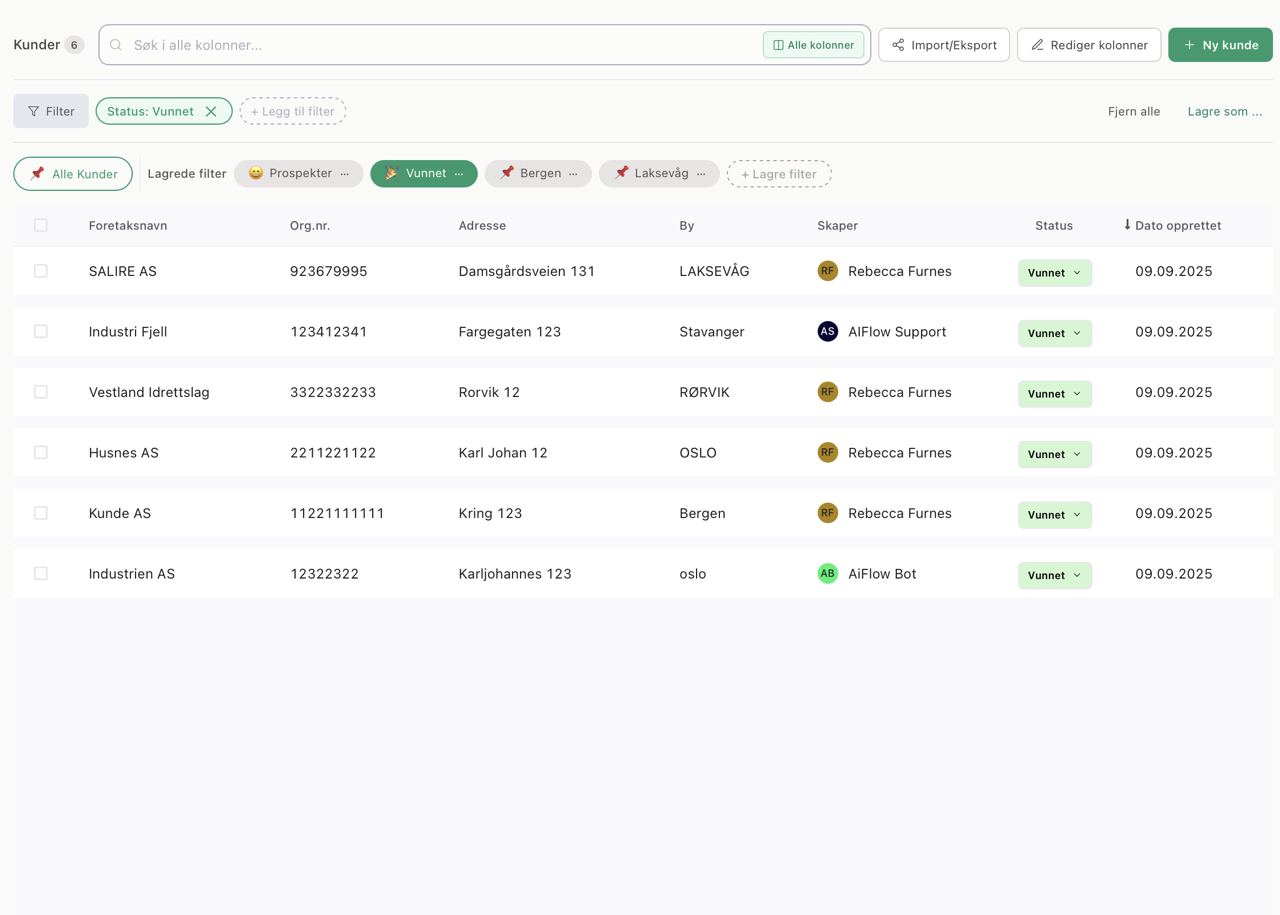
A customer list built for how the team actually works
Most teams have a customer list. The question is where it lives. Some keep it in Excel and update it ad hoc when someone changes jobs or a customer moves. Others export it from a CRM when they need it for a campaign. Both setups have the same problem: the list is never quite right when you look at it.
The customer overview in AIFlow is not an exported snapshot. It is the place where the customer data actually lives. When a salesperson sends a quote, the list updates. When an inquiry comes in from a contact form, the customer appears in the table. When Brønnøysund flags a bankruptcy, the alert is there the same day. You work directly in the table, not in a copy of it.
That means what you see is what is true right now. When you call the customer, you have the right phone number. When you segment for a newsletter, you know the addresses are correct. When the sales manager asks how many customers you have in construction, you can answer in seconds.
Saved filters
Saved filters the whole team can work from
The most common way to lose oversight is to have too many customers and too few ways to look at them. You need a list of customers you have not spoken to in 60 days. A list of everyone with an open quote. A list of customers in your district or your industry. Every time you have to rebuild the list from scratch, you are three minutes away from giving up.
In AIFlow you build these lists as filters. Pick the criteria once, save it, and use the filter again whenever you want. You can filter on status, owner, industry, date, custom tags you have set yourself, or any column in the table. Filters can be shared with the team, so the entire sales department works from the same definition of VIP customer or forgotten follow-up.
Need to export a selection for a newsletter or campaign? Filter first, export after. What you send out is always what you actually filtered for. Need to show your boss how many customers you have in a given industry? The filter is the answer.
Save and name filters for later use
Share filters with the whole team or keep them private
Export to CSV or connect directly to your newsletter tool
Switch between filters with one click
Use the same filter for reports, exports and campaigns
Norwegian registry data
Brønnøysund keeps the list updated every day
Norwegian companies move, change managing director and shift status all the time. If your customer list is an Excel file, it becomes outdated the moment you save it. You don't notice until you send a quote to an address that no longer exists, or call a managing director who left a year ago. By then it is too late to pretend the list was right.
The AIFlow customer overview pulls data from Brønnøysund automatically every day. Organisation name, address, NACE industry code and status update without anyone lifting a finger. If a customer enters liquidation or is registered as bankrupt, the alert appears on the card the same day it becomes public. It is one of the most valuable things AIFlow does, and it happens in the background.
That means your list is reliable. You can filter by industry and trust the code. You can see which customers are in liquidation before the invoice goes overdue. You can report to leadership and know the figures actually reflect reality. No international CRM vendor has this connection to Norwegian public registries, because it requires a direct integration with Brønnøysund that only Norwegian systems can build.
BRREG
Daily refresh
- Organisation name and address updated automatically
- NACE industry code with description for filtering and reporting
- Status (active, in liquidation, bankrupt) flagged the same day
- Employee count where it is publicly available
- Available for every Norwegian company in the Brønnøysund Register
- Enrichment from day one with no extra licence or setup
Excel alternative
Why a living customer overview beats Excel
Most Norwegian SMBs still use Excel as the main tool for their customer list. It works for a while, and breaks down at some point. Here is what you get when the customer overview lives inside the CRM instead of next to it.
01
Always up to date
Brønnøysund updates company data every day. Excel becomes outdated the moment you close the file.
02
Saved filters
Build and share segments for VIP, upsell or forgotten customers. Excel needs someone to remember which tab had the right list.
03
No duplicates
The customer overview checks for duplicates when new customers come in. In Excel it is up to you to remember.
04
Linked to action
One click from table to customer card, quote or meeting. In Excel the trail ends in the column.
05
Shared truth
The whole team sees the same updated numbers in real time. Excel files become copies of copies.
Workflows
How Norwegian businesses use the customer overview
Three concrete ways the team can use the list to actually get something done. Not abstract feature descriptions, just workflows that work from day one.
Forgotten follow-ups
Build a filter for customers with no activity in the last 60 days. Every Monday morning you open this filter and call five of them. It is the simplest and most reliable source of upsell most businesses never tap into. Over a year it gives you dozens of conversations that would not have happened without someone seeing the list.
Risk customers from Brønnøysund
Filter on status in liquidation or bankrupt. You immediately see which customers you should stop deliveries to, or flag for the credit team. Excel cannot tell you this, because it does not know. The Brønnøysund integration in AIFlow gives you the alert the same day it becomes public, not three weeks too late.
Segmentation for newsletters
Filter by industry code and region. Export the list, or connect directly to your newsletter tool through Make.com. A targeted campaign that takes five minutes to set up, not five hours. When the filter updates with new customers, the export updates the next time you send out.
Pipeline review with the team
Use filters on status and owner to see where each salesperson stands. In ten minutes the sales manager can go through every open quote per person, and see what is moving and what has stalled. You do not need a separate reporting tool, because the table is the report.
Frequently asked questions
A customer overview is a unified table view of every customer, supplier and contact you work with. In AIFlow it is a living list that updates in real time, with filters, sorting and direct links to the customer card. You replace Excel and static exports with a table that always matches reality.
Next step
Get a customer list you can actually trust.
Try AIFlow free for 14 days. Brønnøysund updates, saved filters and shared access are included from day one.
14 days free. No card required. Norwegian support during Norwegian business hours. Data stored in the EEA.