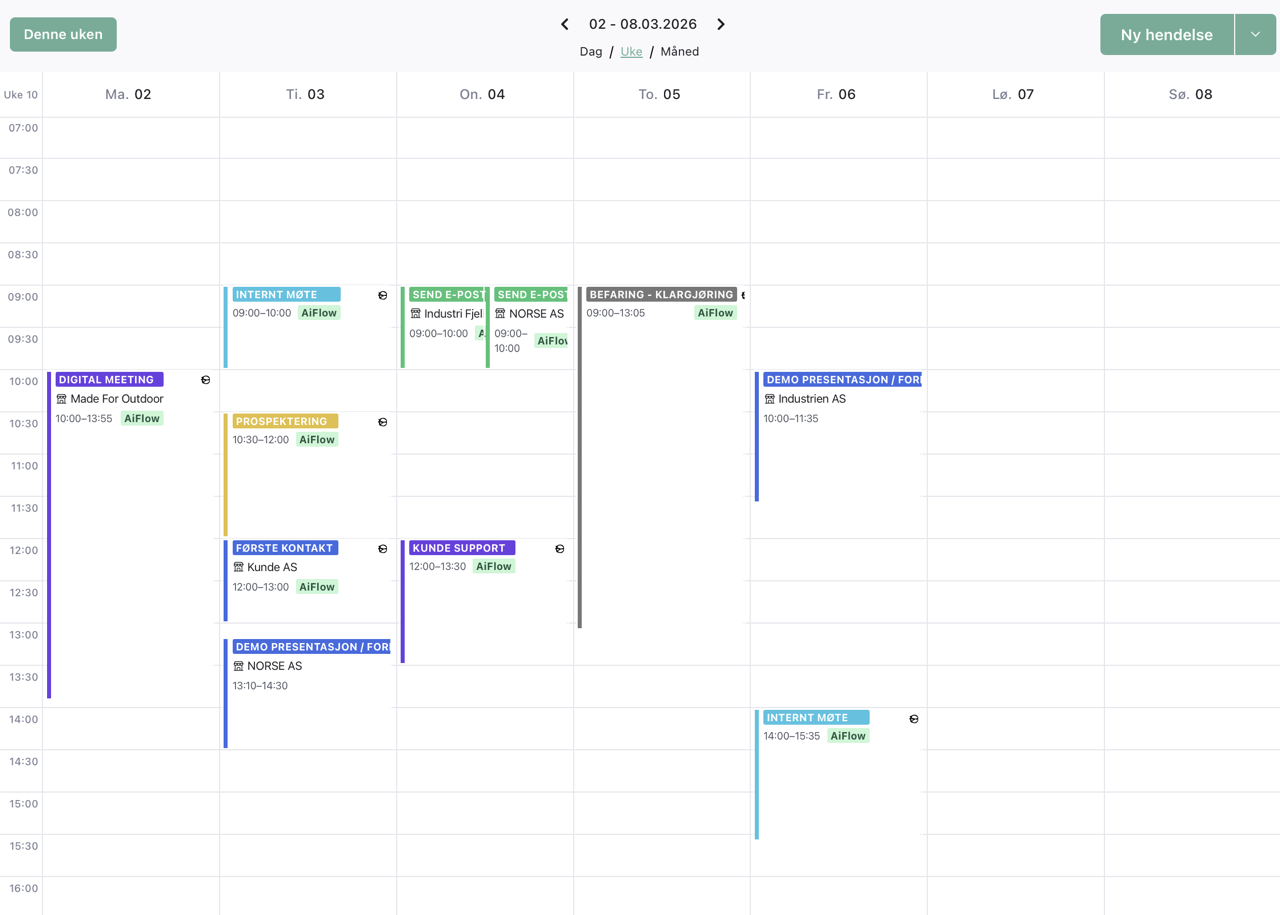
A team calendar linked to the customer, not just another one to manage
Meetings, follow-ups and appointments saved on the customer card. Two-way sync with Outlook and Gmail. See when your colleagues are free without having to ask.
Two-way sync with Outlook and Gmail. Included in AIFlow.
Every meeting logs automatically on the customer card
Two-way sync with Outlook, Gmail, Teams and Meet
Book on behalf of colleagues in the same system
Quick version
The AIFlow calendar in 40 seconds
The AIFlow calendar is a team calendar linked to the customer card. Every meeting you book is connected automatically to the right customer. Two-way sync with Outlook, Gmail, Teams and Google Meet means changes in one place show up in every calendar. The whole team sees each other's availability, and bookers can reserve time on behalf of colleagues. Meetings from contact forms land directly in the calendar.
Definition
What is a team calendar for business?
A team calendar is a shared calendar tool that lets several employees see each other's availability and coordinate meetings without asking. Unlike a personal Outlook or Gmail calendar, the team calendar shows several people's schedules at once. It is built for how teams actually work: someone books for someone else, managers track team activity, and every appointment belongs somewhere.
In AIFlow the calendar is more than a shared view. Every meeting is linked to a customer, a contact person or a project, so the history builds itself. Two-way sync with Outlook and Gmail means the team can keep working the way they are used to, while the customer card always has the latest version. The calendar does not replace Outlook or Gmail. It connects them to the customer data.
A calendar that remembers which customer the meeting was about
You have a calendar in Outlook. Colleagues have theirs. The sales manager has another. When someone wants to know who is free on Thursday, they have to ask in Teams or by email. When someone has had a meeting with a customer, only that one person knows what was said.
The AIFlow calendar does not solve this by replacing Outlook or Gmail. It connects them to your customers. When you book a meeting from the customer card, it shows up in Outlook or Gmail right away. When a colleague creates a meeting in their own calendar and links it to a customer, the whole team sees it. When Brønnøysund flags a customer as bankrupt, you can check who had a meeting planned with them.
You keep working in Outlook or Gmail if you want. Everything that has to do with customers gathers where the data already lives. You skip the question of which tool has the latest version of the truth.
Team calendar
Mon
09:00 Demo
Tue
13:00 Follow-up
Wed
10:30 Closing
Thu
08:45 Planning
Every meeting is saved on the customer card. The whole team sees the same updated picture.
See the whole team's calendar in one place
You rarely need your own calendar in isolation. More often you need to know when colleagues are free, who is in a meeting with which customer, and what is planned for the rest of the week. If the answer requires three messages and a Teams check, you have already lost time.
The team view brings several employees' calendars side by side. Group them by department, by project or by role. Filter out internal meetings if you only want to see customer activity. As a booker you reserve time directly in a salesperson's calendar if you have the right permission, and skip the three-message round trip.
As a sales manager you plan the week with full oversight. As a colleague you know if the person you need to work with is in a meeting. As a new employee you quickly understand how the team actually works.
Several calendars side by side in the same view
Group by team, role or project
Color code by customer or meeting type
Book on behalf of colleagues with the right permission
Filter out internal meetings for a clean customer view
See immediately whether a colleague is free before you ask
Outlook and Gmail two-way sync in real time
AIFlow syncs two ways with Microsoft Outlook and Google Calendar. Changes you make in one place show up immediately in the other. That means the whole team can keep working the way they are used to, with the customer card always up to date in the background.
When the meeting is linked to the customer card, it logs automatically in the customer's history. You see who met with the customer, when it happened, and what was agreed afterwards. If an employee gets sick or changes jobs, the whole meeting history is preserved, and the next person taking over the customer knows right away what has been discussed.
Teams and Google Meet links generate automatically when you pick a meeting format on a new invitation. Meetings from the contact form, like demo bookings and inquiries, land directly in the calendar without you having to copy anything manually.
Two-way sync with Outlook and Google Calendar in real time
Teams and Google Meet links generate automatically
Every meeting logs to the right customer card
The whole team sees the same meeting history
Demo bookings from contact forms land directly in the calendar
Reports on meetings per person and period
Why a CRM calendar beats Outlook alone
Outlook and Gmail are good personal calendars. They are not built to show which customer a meeting was about, or which colleagues are free without you having to ask. Here is what you get when the calendar is part of the CRM instead of next to it.
Context
Every meeting is linked to a customer card or a project, so you do not have to dig through notes to find out what you discussed last time.
Collaboration
The team sees each other's availability in the same view. Bookers reserve time on behalf of colleagues without sending three messages back and forth.
Measurement
Reports show the number of customer meetings, closing meetings and follow-ups per person and period. Sales managers plan the week on numbers, not gut feel.
Continuity
All meeting history is preserved on the customer card. When an employee leaves, the next person has full visibility from day one.
Automation
Demo bookings from contact forms and signed agreements land in the calendar without you having to copy anything manually.
How Norwegian teams use the calendar
Three concrete situations where the team calendar saves time and prevents misunderstandings every single week. Not abstract feature descriptions, just workflows that work from day one.
Use cases
01
The booker who coordinates for sales
The booker sees five salespeople's calendars in the same view. Reserves time directly in the salesperson's calendar, and the customer gets the invitation immediately. The meeting links to the customer, so the salesperson has all the context before the meeting starts. Three messages become one click. The booker stops chasing, and the salesperson stops being interrupted to check whether Thursday works.
02
The sales manager planning the week
Monday morning the sales manager sees how many customer meetings the team had last week, and what is booked ahead. Filters out internal meetings to see customer activity only. Knows immediately who has too few appointments and who has too many. Decisions based on numbers, not guesses. The week's priorities are set in five minutes, not twenty-five.
03
The colleague taking over a deal
A salesperson gets sick in the middle of a quarterly negotiation. The colleague opens the customer card and sees all planned meetings, what was said in the recent conversations, and which agreements are coming up. Takes over without losing the thread. The customer feels no transition cost, because the new salesperson has the same overview as the previous one.
04
Demo bookings from the website
A potential customer fills in the contact form and asks for a demo. The booking lands immediately in Roy's Outlook with the right time, the right participant and full context about what the customer needs. Roy skips the back-and-forth over email, and the customer gets the confirmation without waiting. A new sale starts instead of being left in an inbox.
Frequently asked questions
What is a team calendar for business?
+
A team calendar is a shared calendar tool that lets several employees see each other's availability and coordinate meetings without asking. In AIFlow it is connected to the customer card, so every meeting belongs somewhere. Two-way sync with Outlook and Gmail means the team can keep working the way they are used to, while the customer data is always up to date.
Which calendars can AIFlow sync with?
+
AIFlow syncs two ways with Microsoft Outlook and Google Calendar. Meetings and invitations update both ways in real time. Teams and Google Meet links generate automatically when you pick a meeting format on a new invitation. You work in Outlook or Gmail as usual, and AIFlow keeps the customer card updated in the background.
Does the team calendar cost extra in AIFlow?
+
No. The calendar and Outlook and Gmail sync are included in every AIFlow subscription at no extra cost. You can try the full calendar feature free for 14 days before deciding on a subscription.
Can customers book meetings themselves?
+
Yes, through the contact form. You can set up a booking form linked to your calendar, so customers pick an available time directly and get the meeting confirmed automatically. The booking lands both in Outlook or Gmail and on the customer card in AIFlow. We are working on a more advanced full self-service time-slot booking experience.
Do I have to stop using Outlook or Gmail?
+
No. Most people still use Outlook or Gmail day to day. AIFlow connects on top and makes sure customer meetings also end up on the customer card. You choose where to make changes, and the sync goes both ways automatically. The team can keep working the way they are used to.
Can several people on the team see the same calendar?
+
Yes. The team view brings several employees' calendars into one picture. You can group them by department, project or role, and filter out what is not relevant. Permissions control who sees what. Managers get a complete picture of team activity without having to ask each person.
How is a meeting linked to a customer?
+
When you book the meeting from the customer card, it links automatically to the customer. You can also drag an existing Outlook meeting onto a customer card in AIFlow. After that the meeting is visible in the customer's history with no extra action, and the whole team sees who met with the customer and when.
Can a booker reserve time for someone else?
+
Yes. With the right permission, a booker can see and reserve time directly in colleagues' calendars. The meeting lands in the salesperson's Outlook or Gmail, and they get notified as usual. The customer notices no difference, but you skip the back-and-forth to find a time that works.
Where is the calendar data stored?
+
AIFlow stores calendar data in the EEA and follows GDPR. Access is controlled through role-based permissions, so you decide who on the team sees what. You can export and delete data whenever you want, and document the processing in line with privacy law.
Get a calendar that actually helps the team work together.
Try AIFlow free for 14 days. Team calendar, Outlook and Gmail sync are included from day one.